From Copilot to Agentic Engineer
A short guide to using AI coding tools with senior-engineer judgment: scope, review, verify, and ship.
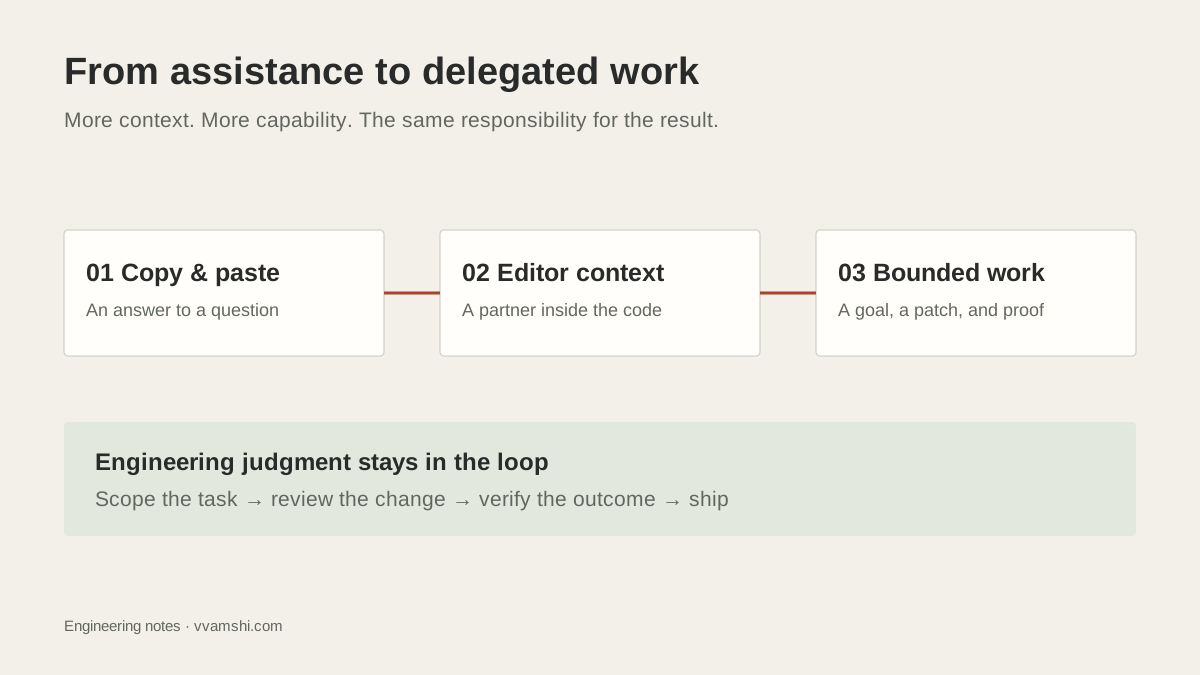
AI coding did not arrive as one big switch. It crept into our work in stages.
First we copied snippets from ChatGPT or Claude into our repos. Then the models moved into editors. Now the best tools can inspect a codebase, make a plan, edit files, run commands, see errors, and hand back a patch.
That is a real shift. But the upgrade is not “the AI writes more code.”
The upgrade is this: a good engineer can now delegate a slice of work, verify it quickly, and keep moving.
Stage one: copy-paste AI
The first version was useful, but clumsy.
You asked a model for a function, a SQL query, a React component, or a bug explanation. Then you copied the answer into your project and fixed whatever did not fit.
This worked best for small, isolated tasks. It was weaker for real product work because the model did not know your repo, your conventions, your tests, or your deployment path.
The lesson from this stage is still valuable: AI is helpful when the problem is clear and the feedback loop is short.
Stage two: the model moves into the editor
Tools like Cursor, Windsurf, Copilot, Claude Code, and Codex changed the shape of the work because the assistant could see more context.
Instead of pasting files into a chat window, you could point the tool at the codebase. It could explain a flow, rewrite a component, add a test, or follow an error from the terminal back into the code.
This is where many engineers get a real productivity lift. The model becomes less like a search box and more like a fast pair programmer.
But the human job does not go away. You still decide the scope. You still review the diff. You still own the result.
Stage three: agentic work
The newer pattern is agentic: give the system a goal, let it inspect the repo, ask it to plan, allow it to edit, and make it verify the result.
That sounds fancy, but the working version is simple.
Do not say, “Build the dashboard.”
Say, “Add client-side search to the dashboard table. Match name, email, and status. Keep the existing table component. Add or update tests. Run the relevant command. Stop if the table needs a larger refactor.”
That is the difference between prompting and engineering. One asks for output. The other defines a bounded handoff.
The senior move is scope
The best engineers do not use agents by throwing giant tasks at them.
They slice the work.
A good task changes visible behavior, is small enough to review, and has a clear way to know if it worked. “Improve auth” is too vague. “Move token refresh into one helper and add tests for expired-token behavior” is usable.
Agents are great at producing volume. That is exactly why scope matters. A vague task creates a vague diff. A vague diff is hard to review. Hard-to-review work becomes risk.
Speed comes after control.
Measure the agent by artifacts
Do not judge the agent by how confident it sounds.
Judge it by what it produces.
Did it create a clean diff? Did it touch the right files? Did it preserve the public API? Did it run the test it claimed to run? Did it add a test that would have failed before? Did the app behave correctly when you clicked through the flow?
If the answer is no, the work is not done.
A productive senior engineer is not the person who trusts the agent more. It is the person who makes trust cheap to earn.
Build your harness
If you keep repeating the same instructions, write them down.
Use project rules, AGENTS.md, .cursor/rules, Copilot instructions, or whatever your tool supports. Tell the agent the package manager, test command, architecture, files to avoid, style conventions, and definition of done.
Then make the repo easier to verify. Add a reliable build command. Keep tests runnable. Document environment setup. Prefer typed boundaries and schema validation.
Your personal harness is the local version of the broader agent experience layer: the context that helps humans and agents do the right thing repeatedly.
Add skills, not just rules
Rules tell the agent how this project behaves.
Skills tell the agent how to do a repeatable kind of work.
That distinction matters. A rule might say, “Use pnpm and do not edit generated files.” A skill might say, “When writing an essay, preserve my voice, keep sections short, add internal links, update metadata, run the build, and check the social preview image.”
As your work repeats, turn it into skills: writing, refactoring, debugging, release notes, image generation, PR review, test writing, data cleanup. The point is not to create process theater. The point is to stop re-explaining the same workflow every day.
Context size matters too. Do not dump the whole repo into every request. Give the agent the smallest context that contains the goal, the relevant files, the constraints, and the verification path. Too little context makes it guess. Too much context makes it drift.
The best prompt is usually not clever. It is specific:
Goal:
What should change?

Context:
Which files, flows, or prior decisions matter?

Constraints:
What should not change?

Verification:
How do we know it worked?

Stop if:
When should the agent ask before continuing?
That is the practical version of prompting. You are not trying to charm the model. You are packaging the work.
I usually dictate that scoped handoff with Wispr Flow instead of typing it. I may earn a commission if you use this link. Same price for you.
The next step
Once you can use coding agents this way, you start seeing the deeper pattern.
A goal becomes a plan. The system acts. It checks the result. It decides whether to continue, retry, or stop.
That pattern is not only for software engineering. It is how AI products should work too.
That is where this essay hands off to Loop Engineering Turns Agents Into Products.
The future does not belong to engineers who generate the most code. It belongs to engineers who design the best loops around increasingly capable tools.