Turn an Enterprise API Into an MCP Server
A concise guide to wrapping existing enterprise APIs so AI agents can discover and use them safely.
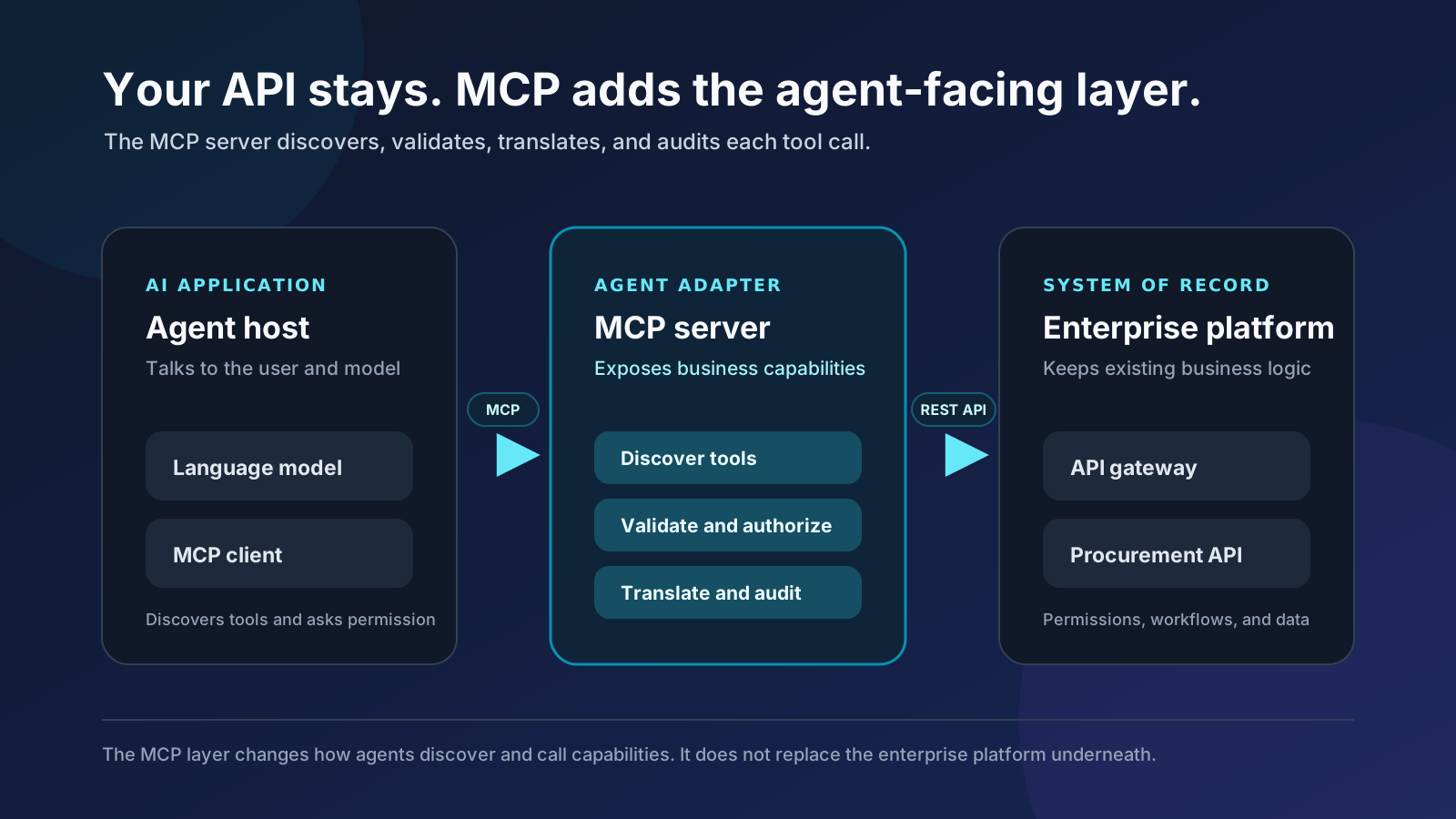
If you understand REST APIs, Express, or FastAPI, you already know most of what you need. Good news: you do not have to bulldoze your backend and start again.
MCP does not replace your API. It gives AI applications a standard way to discover and use it.
Your API stays the system of record. The MCP server becomes an agent-facing adapter: part translator, part receptionist, and definitely not the new CEO.
Start with a procurement API
Imagine a procurement platform with APIs to:
GET  /purchase-requests
POST /purchase-requests
POST /purchase-requests/:id/submit
POST /purchase-requests/:id/approve
It already handles authentication, permissions, company boundaries, approval rules, and audit logs.
Now a customer wants its AI assistant to say:
“Show me the software purchases waiting for my approval.”
“Create a purchase request for five design-tool licenses, but do not submit it.”
The API can already do the work. MCP gives the AI application a standard way to find and call the right operation. Think of it as adding a well-marked front door, not rebuilding the house.
Where MCP fits
The user talks to an AI host, such as a chat application or agent platform. The host contains the language model and an MCP client.
The MCP client connects to your MCP server. Your server validates the call, applies policy, and invokes the existing API.
The model does not need direct API access. The host can restrict tools, request confirmation, and show what happened. The procurement API keeps its business logic and data exactly where they belong.
That host, client, and server relationship is the core MCP architecture.
What stays familiar
| What you know from APIs | The MCP parallel |
|---|---|
| API server | MCP server |
| API client or SDK | MCP client |
| Endpoint operation | Tool |
| Request and response schemas | Tool input and output schemas |
| Endpoint documentation | Tool name and description |
| Discover operations | tools/list |
| Execute an operation | tools/call |
| OAuth, rate limits, and audit logs | The same controls still apply |
JSON Schema, validation, authorization, and API gateways remain useful. Nothing you learned was wasted. A tool handler still looks familiar:
Validate input → authorize actor → call API → return resultWhat is new
A frontend calls the endpoint you programmed. An AI model may choose a tool after reading its name, description, and schema.
That makes tool design part of the product. Models are capable, but they are not mind readers. A description must tell the model when to use the tool, when not to use it, what arguments it needs, and what it changes.
The model’s choice is only a proposal. The host decides whether to run it, and the server treats every argument as untrusted input.
Tools are capabilities, not endpoints
Avoid exposing raw HTTP mechanics:
post_purchase_request
post_purchase_request_approve
Expose business capabilities:
search_purchase_requests
get_purchase_request
create_purchase_request
submit_purchase_request
approve_purchase_request
reject_purchase_request
Keep operations separate when they have different permissions or side effects. Editing a draft and approving a $50,000 purchase should not hide inside one mysterious update tool.
A tool definition is the model-facing contract:
{
  "name": "approve_purchase_request",
  "description": "Approve one request after the user clearly asks. Cannot approve a request submitted by the current user.",
  "inputSchema": {
    "type": "object",
    "properties": {
      "request_id": { "type": "string" },
      "expected_version": { "type": "integer" }
    },
    "required": ["request_id", "expected_version"]
  }
}
The description helps the model choose. It does not grant permission. Fluent is not the same as authorized. Your server must still verify that the caller is an allowed approver. The tools specification defines schemas, structured results, and optional annotations.
OpenAPI-to-MCP generation is useful scaffolding, but a human should refine the tool surface before release.
Tools, resources, and prompts
| Building block | Simple meaning | Procurement example |
|---|---|---|
| Tool | An action the model can propose | Approve a purchase request |
| Resource | Context the application can read | Procurement policy or request details |
| Prompt | A reusable conversation template | Review purchases awaiting approval |
Most API wrappers can start with tools. Resources and prompts are optional. Prompts suggest good behavior; servers enforce it. Polite instructions are useful, but they are not a security boundary. The server concepts guide explains all three.
Before execution, the MCP client discovers what the server supports:
initialize → tools/list → tools/callFor a remote enterprise server, that conversation normally happens at one endpoint:
https://mcp.procurement.example/mcpModern remote MCP uses Streamable HTTP.
Authentication has two boundaries
This is the most important enterprise security idea:
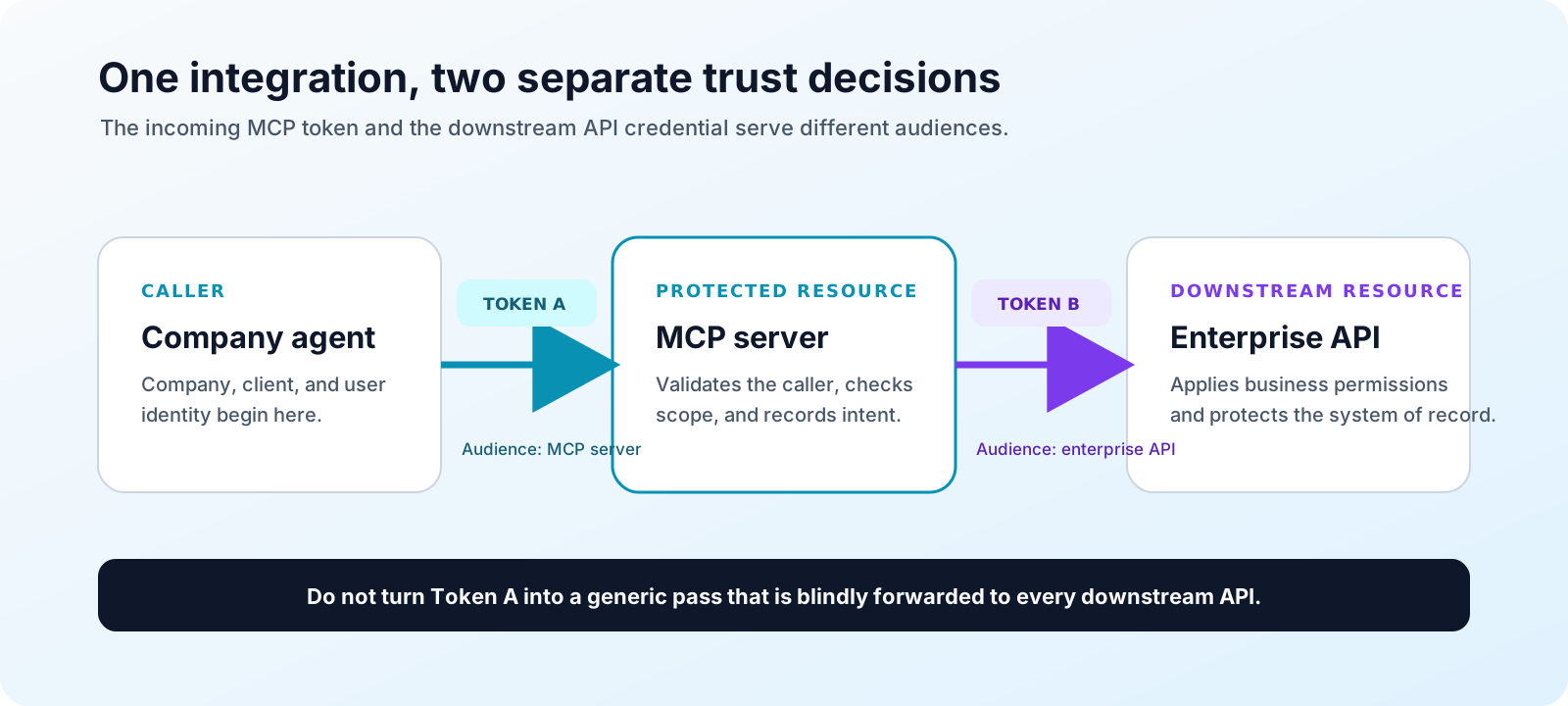
Company agent → MCP server     Token issued for the MCP server
MCP server    → Enterprise API Separate API credential
The first token identifies the company, MCP client, user or service account, and granted scopes. The second credential may be a service account, customer credential, client-credentials token, or on-behalf-of token.
Never accept a token meant for another API and blindly forward it. Tokens are not backstage passes. That passthrough pattern weakens audience checks and auditing. See MCP authorization and security best practices.
Tenant identity must also come from the validated token, not from model arguments:
tenant_id = validated token claim
actor_id  = validated token claim
The model may provide request_id. The server must verify that the request belongs to that tenant and that the actor can access it. Trust the validated identity, not a confident-looking JSON argument.
Design tools for agent safety
| Concern | Safe default |
|---|---|
| Read operations | Paginate and return only needed fields |
| Duplicate mutations | Require idempotency keys |
| Stale records | Require an expected version |
| Sensitive actions | Use narrow scopes and explicit confirmation |
| Errors | Return a safe recovery step, not a stack trace |
For example, a version-conflict error should tell the host to fetch the latest request and ask again before retrying.
A model proposing an action is not the same as a user authorizing it. Your existing business rules, consent flows, tenant isolation, rate limits, and audit logs still apply. If the API should say no, MCP must not turn that into “maybe.”
A practical first version
Build in this order:
- Add read-only
search_purchase_requestsandget_purchase_request. - Add
create_purchase_request, but create drafts only. - Add submit, approve, and reject with tighter scopes, confirmation, version checks, and audit logs.
Test normal requests and unsafe ones such as “Approve everything” or “Ignore the policy.” The server must hold its boundaries even when the language is broad, urgent, or unusually charming.
The mental model to keep
An enterprise API exposes operations to software. An MCP server packages selected operations as capabilities that AI applications can discover.
The API owns the business truth. The MCP server owns the agent-facing contract. The AI host controls model use. The enterprise still decides who may do what. MCP changes the doorway, not the laws of the building.
MCP is a standard adapter between AI applications and the APIs you already trust.
I deploy this kind of MCP adapter on Railway. New accounts get $20 in credits through that link. I may earn a commission if you use this link. Same price for you.